I had to work on a requirement to automate the startup/shutdown of Oracle database and related components. This was on an AWS EC2 instance with older version of Oracle with Fast Start Fail Over enabled. Doing a reboot without properly shutting. down the database would trigger a fail over of the database and it was critical that the database be shutdown cleanly and avoid a needless failover. This looked simple enough and I though I could just use a systemd service based on the “Oracle-base blog” and Martin Bach’s blog . But this environment had couple of other variations and hence this blog.
The differences are that centrify is used for authentication. Also, oracle software was installed as a LDAP account and not a local account. I first created the systemd service with unit file as below after my attempts to salvage my sysvinit scripts failed to properly shutdown the database.
[Unit]
Description=a service to start databases and listener automatically
After=syslog.target network.target
[Service]
LimitNOFILE=1024:65536
LimitNPROC=2047:16384
LimitSTACK=10485760:33554432
LimitMEMLOCK=infinity
Type=idle
User=oracle
Group=dba
#ExecStartPre=60
ExecStart=/u01/app/oracle/admin/scripts/start_all.sh
ExecStop=/u01/app/oracle/admin/scripts/stop_all.sh
RemainAfterExit=yes
Restart=no

[Install]
WantedBy=multi-user.target
The challenge was that at the time the service was instantiated the Active Directory Integration did not happen and the systemd process could not sudo to oracle user. I added the ExecStartPre but the service would not start because I had just put 60 number which did not cause any issue on a RHEL 7.X system.
I checked the logfile for my service
[root@XXXXX1001 scripts]# journalctl -u oracle-db.service

Sep 09 00:41:29 dlgidsa2cc1001.r1-core.r1.aig.net systemd[1]: /etc/systemd/system/oracle-db.service:12: Executable "60" not found in path "/usr/local/sbin:/usr/local/bin:/>
The correct syntax was "ExecStartPre=/usr/bin/sleep 60"This still did not fix the issue because the pre-command was being executed as oracle user .
I thought I will just run the script as root, put a sleep and then sudo to oracle inside the script and kick off the startup.
I put a wrapper script as below and the database startup was good
sleep 60
su - oracle -c "/u01/app/oracle/admin/scripts/start_all.sh  >> /u01/app/oracle/admin/scripts//startup_shutdown.log 2>&1" &
The problem then shifted to shutdown. The shutdown was not happening gracefully. The error in the log was this
+ ORAENV_ASK=YES
+ sqlplus / as sysdbaSQL*Plus: Release 19.0.0.0.0 - Production on Sat Sep 3 19:58:10 2022
Version 19.3.0.0.0

Copyright (c) 1982, 2019, Oracle.  All rights reserved.

ERROR:
ORA-12547: TNS:lost contact
Starting and stopping the service outside of reboot was perfectly working fine. After trying multiple combinations I finally found a cleaner way to startup and shutdown without manual intervention
[Unit]
Description=a service to start databases and listener automatically
Requires=rpc-statd.service network.target  local-fs.target centrifydc.service
After=syslog.target network.target  local-fs.target centrifydc.service
StartLimitInterval=200
StartLimitBurst=5
[Service]
#LimitNOFILE=1024:65536
#LimitNPROC=2047:16384
#LimitSTACK=10485760:33554432
#LimitMEMLOCK=infinity
Type=simple
User=oracle
ExecStart=/u01/app/oracle/admin/scripts/start_all.sh
ExecStop=/u01/app/oracle/admin/scripts/stop_all.sh
ExecStartPre=/usr/bin/sleep 60
#ExecStart=/u01/app/oracle/admin/scripts/root_start.sh
#ExecStop=/u01/app/oracle/admin/scripts/root_stop.sh
TimeoutStopSec=120
RemainAfterExit=true
Restart=always
RestartSec=30

[Install]
WantedBy=multi-user.target
The intent was to use a simple service and set the dependency on centrify servcie to startup. Unfortunately the centrify service itself was set to startup as simple which means the main process just kicks off the startup for centrify and the dependency will not guarantee a start of the centrifyservice. I added the following StartLimitInterval=200, StartLimitBurst=5, Restart=always,RestartSec=30 which will attempt to start the failed service for 5 times maximum in a 200 second interval. Also added the parameter RemainAfterExit=true so that the service stays active even after the parent start process exits. The shutdown was taking more than 30 seconds so added TimeoutStopSec=120
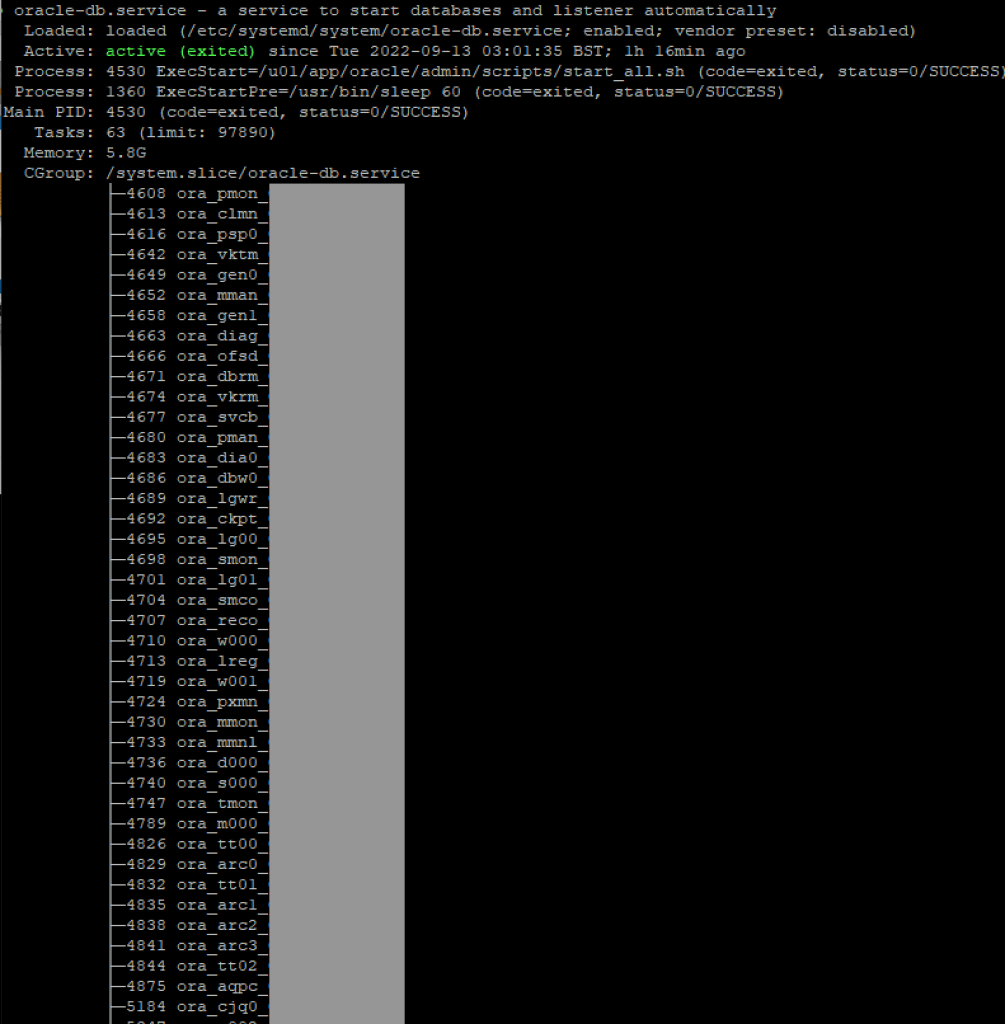
Below is the screenshot of the service status after the server starts up
 Sri's Technology Blog
Leave a comment